What's new in eLabFTW 6.0
Introduction
eLabFTW 6.0 is here (or maybe will be here if you are reading this before the final release)!
This is a major release, with a few breaking changes. Make sure to read our post explaining why we introduced breaking changes in this release.
This post is about the new features and the fixed issues that are contained in this new release.
A note about “stable” releases
eLabFTW is a living project — “stable” should not be taken to mean that it is no longer evolving. Version 6.0.0 is production-ready, but minor bugs will surface once it is in wide use, and patches will follow.
We target major releases every few months and issue patches as needed. A “.0” tag means the code and documentation are ready to deploy, but be sure to apply subsequent patch releases so your users are not left with already-fixed bugs.
See also our dedicated blog post about the eLabFTW release schedule.
Video
Breaking changes
This major release contains many breaking changes for Sysadmins. They are described below.
New features and enhancements
Speed
This new version will definitely feel much faster. Not because we improved many different little things (we did though), but simply because of a one-line change in how we build the JavaScript code served on the page. Going from “bundle everything into two big chunks” to “make smart decisions about chunking” has had a HUGE impact. As you can see now, after loading the page, it is almost immediately “functional”, meaning we no longer have this little delay after page load before we can start clicking on elements and interacting with the page. That delay was due to that huge bundle of JavaScript which needed to be parsed by the browser at every page load. Now instead of loading 27 Mb of JS/CSS in 4 requests, we load 7.21 Mb in 2 requests. The rest is loaded on-demand, when needed. It would have been great to discover this sooner, but better late than never…
We also made improvements on the PHP/SQL side to improve queries and make the app lighter and faster. Our goal is for the application to be extremely fast and responsive, because that’s how we like our apps, especially the ones we use daily.
Better table view
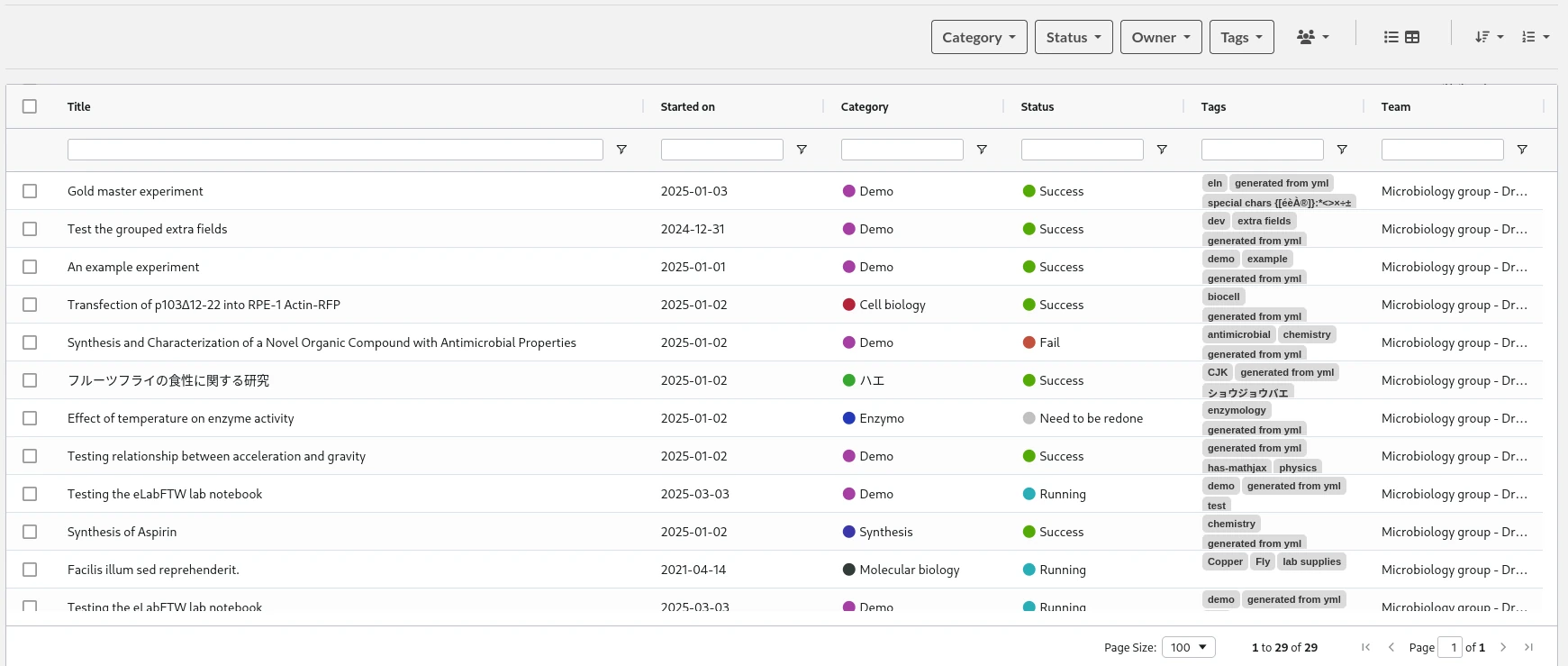
If you list entries in table view, the table will now remember the size and order of columns. You can pin columns to the left and they will stay there. You can see the colors of categories and status, and click on them to add a filter on it.
Multi-value custom fields
Previously, it was only possible to have multiple values in a Custom Field for a single type: Dropdown menu. This has now been extended to all the other types.
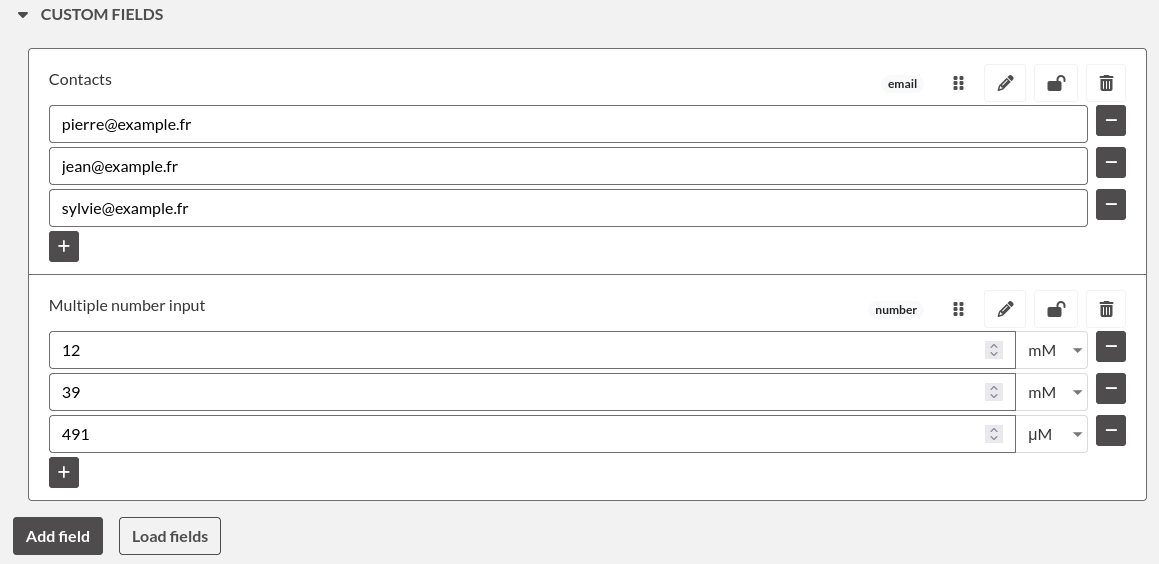
In the modal window when creating a field, check “Allow multiple values?” at the bottom.
New appearance page
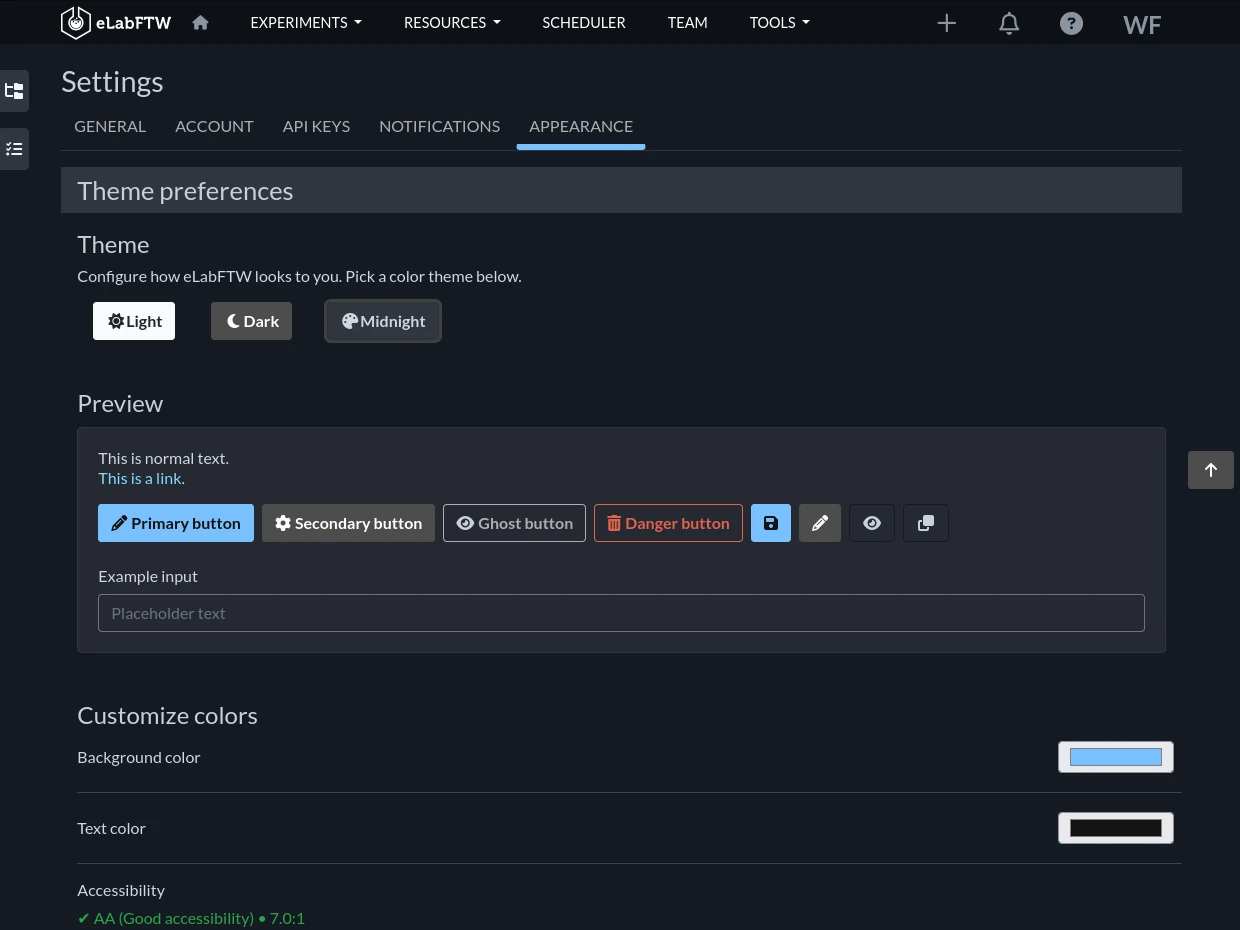
You will find a new menu entry in the user menu: Appearance. This allows you to customize your interface a bit, by selecting from three different themes: Light, Dark and Midnight (new). You can also change the main primary color now!
Training mode
This feature is useful if you’re doing a live training session: it adds a halo around the cursor that changes on clicks, in order to improve visibility of actions. Enable it from the Settings page:

Internationalisation
Two new languages have been added: Croatian and Swedish.
Also, we are now using an LLM to help with the missing translations. This allowed us to bring all languages to 100% translated. The translations made by humans on Poeditor are still the source of truth, but they are completed by AI if necessary. It was already the case (Poeditor and Poedit have functions to do that), but we’re now using a context-aware LLM that can check in the source code where this string is coming from to get context. If you feel a translated string sounds weird, make sure to let us know!
Support for multiple timezones
The software will now correctly display the date relative to the user’s browser timezone rather than the server timezone.
Full permission modal window for modification of permissions from the index
When you select entries from the index, a new section appears with buttons to export, add tags, links or archive entries. We added buttons to modify read or write permissions in batch, with full permissions window, replacing the previous dropdown menus that could only allow one to set the base permission, but not Teams, User groups or Users.
You can also manage booking permissions now!
Spreadsheet editor
Adds support for multiple worksheets and fixes a security issue.
Containers
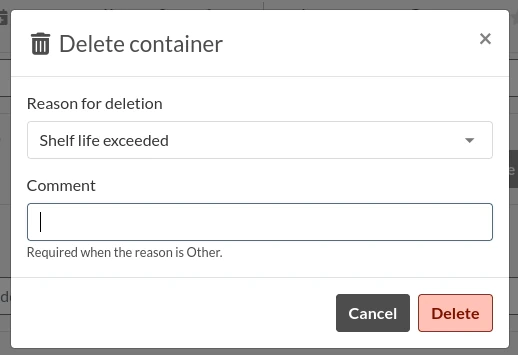
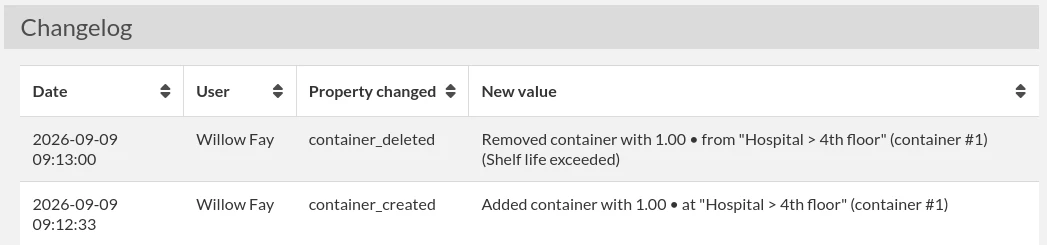
The inventory continues to be improved, with the addition of Capacity for inventory locations. There is also a new Admin setting to capture the reason for deletion of containers, so it’s logged in the Changelog.

Offline application
We released a Desktop application that can work offline: eLabFTW Desktop. It is still in its infancy, but it is working. Try it out!
Offline application documentation.
New elabctl version
elabctl is a small bash script that you might use to do the backups and updates. The repository elabftw/elabctl has disappeared and the code has been merged into the main elabftw/elabftw repository under containers/elabctl. We changed a bit how the tool worked:
- do not require
dialoganymore - do not require
sudo: directly ask to be run as root - remove unattended installation mode: if you need this, better use ansible
- after install, it will directly ask to start containers and initialize the database
- mysql-backup command now also removes the raw dump from the container
Various upgrades and bugfixes
This release contains many bugfixes for issues that were reported, and also updates to libraries such as MathJax version 4 and many others.
- custom field names can now include a single quote
- fix a crash of the 3D visualizer of proteins in some conditions
- fix an issue where the autocomplete for links in a table on the right side of the screen would be masked
- restrict a lot more what anonymous users can see
- fix contrast and color themes
- inventory: fix an issue where the contents of child containers were not displayed when listing the contents of the parent container
- index: allow fine-grained permissions settings from the main page
- index: tags are now shown in the active filters list too
- index: table mode: add colors and filter on click
- sysadmin: allow removing a user from a team
- navbar: better UI for navigating to a category from the menu
- fix a bug where “Always show owned” was not working as expected
- editor: fix an issue where the text editor was very big on page load
- fix an issue in the scheduler with visibility of resources
- fix an issue when filtering several tags
- fix an issue with encoding of links in plaintext emails
- fix an issue where several paragraphs of text could not be selected in accordions in Chrome
- fix a bug in batch actions
- fix loading templates in tinymce
- prevent users from changing firstname and lastname during saml initialization of account
- fix bug with CJK characters in pre-formatted text
- always allow viewing uploaded files even without editing rights
- allow internal links to open in a new tab
- fix logo on 2fa page
- add auto rollback for failed mysql updates
- make the uploads check command work with S3
- allow glob pattern for domain allowlist
- stop trying to send email if the error was a final error code 550
- add a deletion modal window
For Sysadmins
You cannot upgrade to version 6.x without reading the upgrade documentation. A Discussion is also available so you can quickly ask a question or report an issue: Discussion about eLabFTW 6.0 on GitHub.
Main points:
- container must be deployed as a user
- it listens on port 8080 internally
- chem-plugin is no longer necessary
- it should be deployed with a read-only filesystem and tmpfs
- volumes need to be adjusted
- nginx logs have changed (they are now json)
- MySQL must be at least version 8.4
Make sure to read our post explaining why we introduced breaking changes in this release.
Security aspects
On top of the major changes such as running the container as a user, we also hardened the image. We now have a leaner runtime, with fewer packages. We removed curl, git, yarn and composer from the final image. There is now a proper build image where these tools exist, and they are no longer present in the final image. This work also helps reduce the number of CVEs that get flagged on an image, reducing the noise.
We also added rate limiting on the login controller and re-wrote nearly all the authentication code to make it easier to reason about and also more secure. For instance, we added rate-limiting on multi-factor authentication and verification of the origin of the SAML response.
There were also countless fixes or improvements in the application code or its dependencies. If you are serious about the security of your data and infrastructure, you’ll want to update to version 6.0 ;)
For developers
It is now very easy to set up a development environment. The CONTRIBUTING documentation has been simplified a lot and we made changes to reduce the friction of deploying a local instance. We think it is important to make it easy for external contributors to install the software locally so they can contribute to the code.
Conclusion
Thanks to everyone who contributed, directly or indirectly, to this release. Reporting issues on the bug tracker or in the chat is very valuable! Make sure to report any bug you might find, even the most minor one; it is always appreciated.
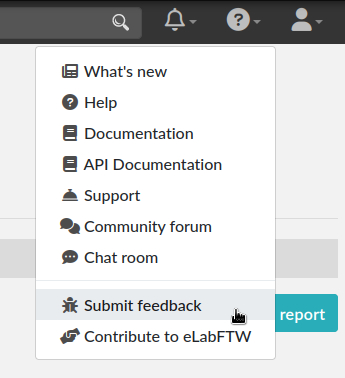
To report a bug, select “Submit feedback” from the top-right help menu:
The adventure continues!